


Severe Weather Alerts
4.2298.00 Reviews
App Specs
- Version
- 2.2.4
- Updated On
- License
- Free
- Downloads
- 100,000+
- Developer
- Quinn Conrad
- Categories
- Weather
- Platform
- Android
Screenshots
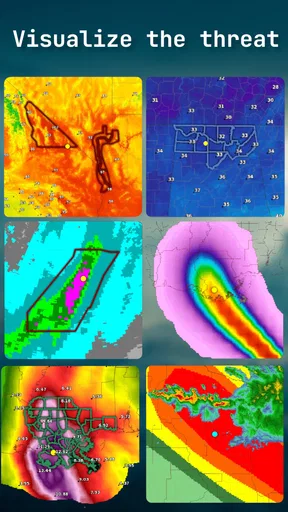
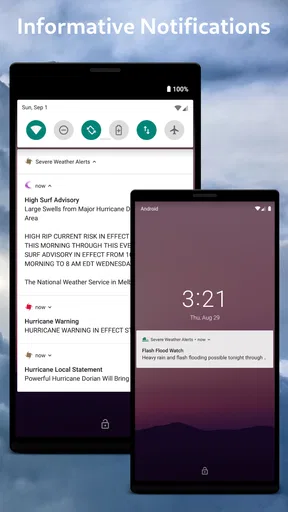
 Analysis by AppCompare
Weather alerts are most useful when they help you make a decision before conditions turn dangerous, not when they simply add another notification to your phone. That practical role is where Severe Weather Alerts makes sense to me: it focuses on warnings from the National Weather Service, rather than trying to be an all-purpose weather dashboard. I’d consider it a useful extra layer for people who need to know when a hazard may affect their area, while keeping expectations realistic about what any alert app can do.
Why warnings can feel easy to miss
Weather information is often spread across a forecast app, local news, and alerts that arrive at inconvenient moments. The hard part is not always finding a temperature; it is noticing that a warning matters to where you are and deciding what to do next. A dedicated warning app can make that task more direct, but only if its alerts are set up in a way that suits your routine.
With a hazard-focused tool, I would start by thinking about which situations deserve an interruption. Someone who drives regularly may want to take severe-weather notices seriously even when they are away from home. Someone who mainly checks the weather before a walk may prefer fewer interruptions and a quick manual check before heading out. Choosing a sensible balance matters more than turning on every possible notification and eventually tuning them all out.
Setup checks that prevent avoidable confusion
When I install a weather warning app, I first check that the location I care about is the one being monitored and that notifications are allowed in the phone’s settings. Those are simple checks, but they can explain why an alert seems irrelevant or why nothing appears to arrive. If the phone is set to silence notifications, or if the app is not allowed to send them, changing preferences inside the app alone may not be enough.
I also make a habit of checking the app before relying on it for a particular plan. Open it while you have a steady connection, confirm that the information is loading, and look at the relevant area rather than assuming that yesterday’s setup still fits today’s trip. This is especially useful before leaving for a place with patchy reception: an app cannot make a weak connection reliable, so checking early gives you time to consult another source.
Features That Keep You Informed
One of the first things you’ll notice about Severe Weather Alerts is its user-friendly interface. It’s like having a weather expert in your pocket, minus the jargon. You can easily navigate through the app to find the information you need without getting lost.
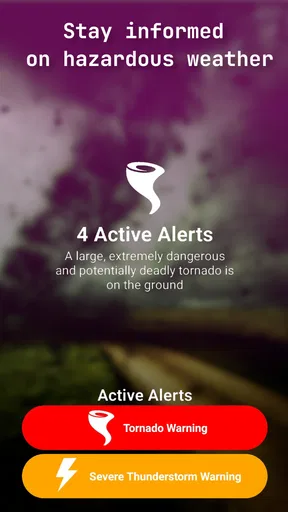
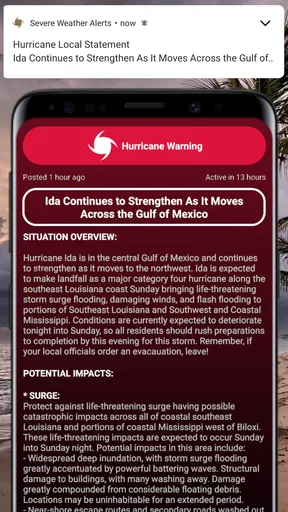
The app sends you real-time notifications whenever there’s a significant weather change. Whether it’s a tornado warning or a hurricane alert, you’ll be the first to know. The notifications are customizable, so you can choose what kind of alerts you want to receive. No more unnecessary buzz about minor changes when you’re only worried about the big stuff.
Worth Reading Before You Choose

EA SPORTS FC Mobile 26 Is a Bigger Football Game, but It Takes Time

Flipboard Shows What News Apps Must Do Beyond the Feed

Switching to Android Auto Means Rethinking Your Driving Routine

Google Calendar Makes a Crowded Week Easier to Manage

Ludo King Makes the Most of the Minutes Between Plans

Baby Panda World Brings Quick Play to Modern Phones, but Its Game Library Feels Busy
Detailed Forecasts
When it comes to forecasts, this app doesn’t hold back. You get hourly, daily, and even weekly forecasts that are surprisingly accurate. It’s like the app’s been taking weather lessons from the pros. The details include temperature, humidity, wind speed, and more. If you’re planning a weekend getaway, this app’s got your back.
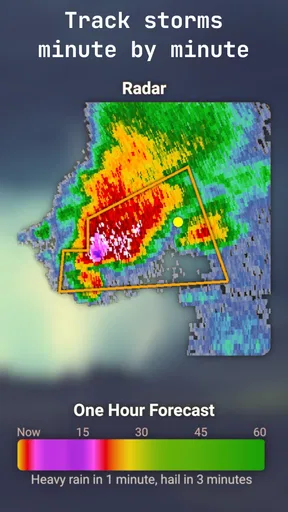
One feature I particularly enjoyed is the radar maps. They’re interactive and give you a visual representation of weather patterns in your area. You can zoom in and out to get a better view, making it easier to plan around any impending storms.
Making an alert useful in everyday life
The best way I see to use severe-weather notifications is as a prompt to pause and check the situation, not as a complete plan. For example, if I’m preparing to drive across town and a warning appears, I can reconsider when to leave, look at conditions along the route, and follow local instructions. The alert helps put the issue on my radar; it does not tell me that every street is unsafe or that a route is clear.
For a household, it can help to agree in advance on what an alert should trigger. A family might decide to bring outdoor items inside or move away from windows when official guidance calls for sheltering. That small conversation is more useful than scrambling to interpret a notification together. Keep the phone charged when severe weather is possible, too; a warning is only helpful if you can see it and act on it.
It also helps to distinguish a warning from ordinary forecast changes. A forecast is useful for planning the day, while a hazard notice deserves a more immediate check of official guidance. If you receive an alert while busy, read its details as soon as it is safe to do so rather than reacting to the notification preview alone. That reduces the chance of misunderstanding the area or timing involved.
Why You’ll Love It
Okay, I’ve got to say, this app is a lifesaver for those of us who aren’t exactly weather-savvy. It breaks down complex weather data into bite-sized pieces, so you’re not left scratching your head. Plus, who doesn’t love the idea of being prepared for anything?
I found the app’s layout to be quite intuitive. The design is clean, and everything is where you’d expect it to be. You won’t find yourself squinting at tiny fonts or struggling to tap on small buttons. It’s designed with the user in mind, which I appreciate.
Recovering when something seems wrong
If an alert does not appear, I would avoid assuming immediately that the weather service has missed something. First, check whether notifications are enabled both in the app and in the phone’s settings. Then open the app and confirm that it can load current information. A connection problem, a muted phone, or a location setting that does not match the area you care about can all make the experience seem inconsistent.
If the map or other information is slow, give it a moment and try again when your connection is better. Repeatedly tapping a loading screen rarely helps, and switching between several apps can make it harder to tell which source is current. For urgent conditions, use official local emergency guidance and available alerts rather than waiting for one screen to refresh.
Location deserves particular attention when you travel. An app may be set up around the place you usually live, while your immediate concern is somewhere else. Before a road trip or a day away, check the area relevant to the plan and keep a trusted local source available as a backup. This simple habit is more dependable than assuming one location setting will automatically cover every situation exactly as you expect.
Where it fits among weather apps
Many general weather apps put everyday forecasts first: temperatures, rain chances, and a broad view of the week. That is convenient if your main question is whether to carry a jacket. Severe Weather Alerts is more appealing when the question is whether a hazardous-weather notice needs your attention. I would use the two approaches as complements rather than expecting a warning-focused app to replace every forecast tool.
Compared with relying only on television or local news, an app can be easier to check when you are away from home, but it still depends on your phone being available and connected. Compared with checking a weather website manually, notifications may save a step, though they can also interrupt you. The right choice depends on whether you value proactive warnings or prefer to seek out updates yourself.
The app is developed by Quinn Conrad and is free to download, with optional in-app purchases listed from $1.99 to $19.99 per item. It has a 4.2 average from 520 ratings and more than 100K installs. It is rated for Everyone, was released on September 1, 2019, and its current version is 2.2.4, requiring Android 6.0 or later. Those details make it approachable for many Android users, though the purchase options are worth noticing if you prefer to avoid in-app spending.
Room for Improvement?
Now, no app is perfect, right? While Severe Weather Alerts excels in many areas, there are a couple of tweaks that could make it even better. Occasionally, the app takes a little longer to load, especially when accessing radar maps. It’s not a deal-breaker, but a speed boost would be nice.
Another thing is the ads. While they’re not overly intrusive, they do pop up now and then. A premium version could be a solution for those who prefer an ad-free experience, although that’s not currently an option.
That loading delay is more than a cosmetic annoyance if you wait until a storm is already close to inspect a map. I would check radar and other relevant information ahead of time when planning an outdoor activity, then use a warning as a reason to reassess. Likewise, anyone who needs detailed route planning, specialized forecast tools, or a single app for every kind of weather information may be better served by a broader weather service alongside this one.
I would also be cautious about treating a phone notification as a guarantee. Alerts are one way to receive information, not a substitute for local authorities, emergency broadcasts, or common-sense preparation. If you are in an area where severe weather is possible, know where you would go for shelter and how you would receive updates if your phone battery runs low or connectivity drops.
Who should keep it—and who can skip it
I can see this app being a good fit for people who live in places where severe weather is a recurring concern, commuters who want a nudge to check conditions, and households that prefer a direct warning channel on a phone. It may also suit someone who already likes a general forecast app but wants a separate place to pay attention to hazards. Its focused purpose is a strength when warnings are the main reason for downloading it.
I would skip it if you only want a simple daily temperature and rain forecast, dislike notifications, or expect a warning app to provide a complete emergency plan. It may also be less satisfying if your priority is a highly detailed trip forecast or if you need dependable information while offline. In those cases, a general weather app, local government alert service, or another established source may be a better primary tool.
Final Thoughts
Overall, Severe Weather Alerts is a must-have for anyone who likes to stay ahead of the weather game. Whether you’re an adventurer, a commuter, or someone who just likes to be prepared, this app has something for you. It’s a handy tool that delivers on its promise to keep you informed. So, if you’re tired of being caught off-guard by the weather, give this app a try. You’ll thank me the next time you avoid a sudden downpour or blizzard.
My practical recommendation is to treat it as one part of a sensible weather routine: set up the location and notification settings carefully, check that information loads before you need it, and use official guidance when conditions become serious. That approach plays to the app’s warning-focused purpose without asking it to do more than a phone app can. If timely hazard notices are what you want, it is worth trying; if you mainly need broad forecasts or specialized planning, pair it with a tool built for those needs.
Pros
- Real-time notifications keep you updated.
- Customizable alert preferences.
- Covers multiple weather phenomena.
- User-friendly interface.
- Accurate
- localized forecasts.
Cons
- Frequent alerts can be overwhelming.
- Requires stable internet connection.
- Ads can be intrusive at times.
- Limited offline functionality.
- Battery consumption is noticeable.
FAQs for Severe Weather Alerts
What features does the Severe Weather Alerts app offer?
The Severe Weather Alerts app provides real-time notifications for a variety of weather conditions, including thunderstorms, hurricanes, tornadoes, and more. It offers radar images, detailed forecasts, and safety tips tailored to your location. Users can customize alerts based on preferences and specific weather events.
Is the Severe Weather Alerts app free to use?
The app offers a free version with basic alert features. However, for advanced options like detailed radar imagery, extended forecasts, and ad-free experience, a premium version is available for a subscription fee. This ensures users can choose based on their needs and budget.
How accurate are the weather alerts provided by the app?
The alerts are sourced from reliable meteorological services, ensuring high accuracy and timely warnings. The app uses advanced algorithms and real-time data to provide precise updates. However, users are advised to cross-reference with local weather services during severe conditions for the most accurate information.
Can I customize the notifications in the Severe Weather Alerts app?
Yes, the app allows customization of notifications. Users can select specific types of weather events they wish to be alerted about, adjust the alert frequency, and set quiet hours to avoid disturbances during specific times. This ensures a tailored user experience based on individual preferences.
Does the app require an internet connection to function?
An internet connection is essential for the app to receive real-time updates and notifications. While some basic information may be cached for offline viewing, live data like radar images and alerts are dependent on an active connection to ensure users receive the most current information.


